
How to Reduce Cloud Costs in 2026 Without Slowing Down Your Engineering Team
How to Reduce Cloud Costs in 2026 Without Slowing Down Your Engineering Team Cloud adoption has changed the way modern businesses build, deploy, an...
How to Reduce Cloud Costs in 2026 Without Slowing Down Your Engineering Team
Cloud adoption has changed the way modern businesses build, deploy, and scale digital products. Teams can launch applications faster, expand globally, experiment with new services, and support growing customer demand without waiting months for physical infrastructure.
That flexibility is powerful. It is also expensive when left unmanaged.
Cloud costs do not usually explode overnight. They creep up quietly. A development environment stays active after office hours. A Kubernetes cluster runs with oversized nodes. Storage volumes remain attached to old workloads. Databases are provisioned for peak traffic but used at a fraction of their capacity. AI workloads begin consuming more compute. Monitoring tools, backups, snapshots, data transfers, and unused resources slowly add more weight to the monthly bill.
Before long, leadership starts asking a familiar question:
Why is our cloud bill increasing when our usage has not grown that much?
The answer is simple: cloud spend scales automatically, but cloud governance often does not.
In 2026, cloud cost optimization is no longer just a finance concern. It is an engineering, DevOps, architecture, security, and business performance concern. Companies need cloud environments that are scalable, reliable, secure, and cost-efficient at the same time.
The real goal is not to spend the least amount possible. The goal is to make every cloud dollar work harder.
That means reducing waste, improving visibility, automating controls, and giving engineering teams the right tools to make smarter infrastructure decisions without slowing down delivery.
Why Cloud Costs Keep Rising
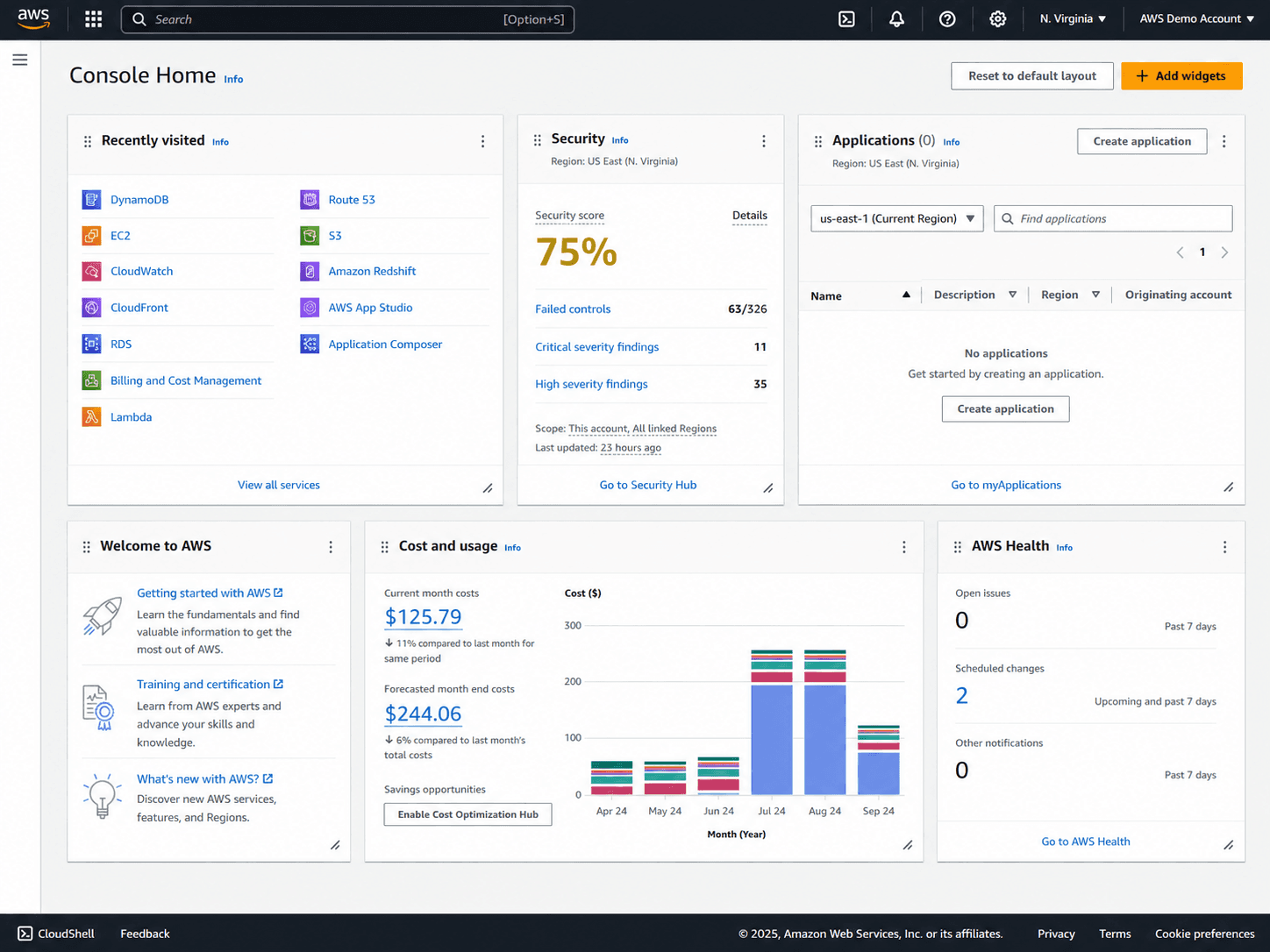
Cloud bills grow for many reasons, but most cost problems come from a few common patterns. These patterns are especially common in fast-moving teams where engineering velocity is prioritized over infrastructure review.
And to be clear, that is not always a bad thing. Engineers often overprovision because reliability matters. Nobody wants an application to crash during peak traffic because the infrastructure was sized too aggressively. The problem starts when temporary decisions become permanent costs.
1. Overprovisioned Resources
Overprovisioning happens when cloud resources are larger than what the workload actually needs.
For example, a virtual machine may be running with high CPU and memory capacity, but actual utilization stays low most of the time. A database may be sized for a traffic spike that happens only once a month. A Kubernetes pod may request far more CPU and memory than it consumes in production.
This is one of the most common sources of cloud waste. The cloud makes it easy to add capacity. But without regular review, teams end up paying for performance headroom they rarely use.
2. Idle and Forgotten Resources
Every cloud environment has ghosts.
Old test environments. Unattached storage volumes. Stale snapshots. Load balancers with no active traffic. Development servers that run all weekend. Temporary resources created during troubleshooting and never removed.
These idle resources may look small individually, but at scale they become expensive. Worse, they often provide no business value at all.
This is the cleanest category of cost reduction because removing idle resources usually does not impact performance, reliability, or customer experience.
3. Lack of Cost Visibility
You cannot optimize what you cannot see.
Cloud bills are complex. They include thousands of line items across compute, storage, networking, databases, monitoring, backup, security, analytics, and third-party services. In multi-cloud or hybrid environments, the complexity becomes even harder to manage.
The issue is not only knowing the total bill. The real challenge is understanding who owns the cost, which workload created it, and whether that spend is producing business value.
Without visibility, cloud optimization becomes guesswork.
4. Weak Cost Ownership
In many organizations, finance sees the bill, but engineering controls the infrastructure. That creates a gap.
Finance may ask for lower costs, but engineers need the technical context to make safe changes. Engineers may make architecture decisions every day, but they may not see the cost impact of those decisions until weeks later.
Cloud cost optimization works best when engineering teams are part of the process. Cost control should not feel like a finance team shouting from across the room. It should be built into engineering workflows, dashboards, deployment reviews, and infrastructure planning.
5. Poor Autoscaling Configuration
Autoscaling is supposed to match infrastructure capacity with real demand. But when configured poorly, it can create unnecessary spend.
Some systems scale up quickly but scale down slowly. Others use static thresholds that no longer match actual traffic patterns. Kubernetes clusters may add nodes but fail to pack workloads efficiently. Serverless workloads may generate unexpected costs when usage spikes.
Autoscaling is not a set-it-and-forget-it feature. It needs continuous tuning.
6. Rising AI, Data, and SaaS Costs
Cloud cost optimization in 2026 is not just about virtual machines and storage anymore.
AI workloads, GPU compute, LLM APIs, data platforms, analytics tools, and observability platforms are becoming major cost drivers. Many teams are now paying for cloud infrastructure plus AI usage plus SaaS-based developer tools plus monitoring and security platforms.
This creates a new challenge: cloud costs are no longer limited to the cloud provider bill.
Modern cost optimization needs to include infrastructure, Kubernetes, data workloads, AI usage, third-party platforms, and engineering workflows.
What Cloud Cost Optimization Really Means
Cloud cost optimization is not simply about cutting resources. That is where many businesses get it wrong.
Random cost-cutting can damage performance, create outages, frustrate engineers, and slow product delivery. Good optimization is more strategic. It focuses on removing waste while protecting speed, reliability, and scalability.
A strong cloud cost optimization program answers five questions:
- What are we spending money on?
- Who owns each cost?
- Which resources are underused or idle?
- Which workloads are worth the spend?
- How do we prevent waste from coming back?
The last question matters most.
A one-time cleanup may reduce the bill temporarily, but if the process does not change, the waste will return. Sustainable optimization requires automation, governance, cost visibility, and engineering ownership.
In other words, cloud optimization is not a one-day project. It is an operating model.
Step 1: Start With Complete Cloud Cost Visibility
The first step in reducing cloud costs is understanding exactly where the money is going.
Many companies only look at their cloud bill at the account or service level. That is useful, but it is not enough. To optimize effectively, teams need visibility by application, team, environment, feature, customer segment, and workload.
For example, instead of only seeing compute costs as one large number, a better cost model separates spending across:
- Production services
- Analytics workloads
- Development environments
- Idle resources
- Testing pipelines
- Shared platforms
That level of detail changes the conversation. Now the business can ask better questions:
- Is the production API cost healthy compared to revenue?
- Are analytics jobs running too often?
- Should development environments shut down after work hours?
- Are test pipelines consuming too much compute?
A complete cloud cost assessment should include:
- Cloud provider costs across AWS, Azure, Google Cloud, or private cloud
- Kubernetes cluster costs
- Storage and backup costs
- Data transfer and egress costs
- Database and analytics costs
- AI and machine learning workload costs
- Monitoring and observability costs
- Environment-level costs, including production, staging, testing, and development
- Team-level and project-level cost ownership
Without this visibility, optimization can become risky. Teams may cut the wrong resources while leaving the actual waste untouched.
At CodetoKloud, this is often where cloud optimization begins: with a detailed assessment of infrastructure usage, cost patterns, performance requirements, and business priorities.
Step 2: Remove Idle and Zombie Resources
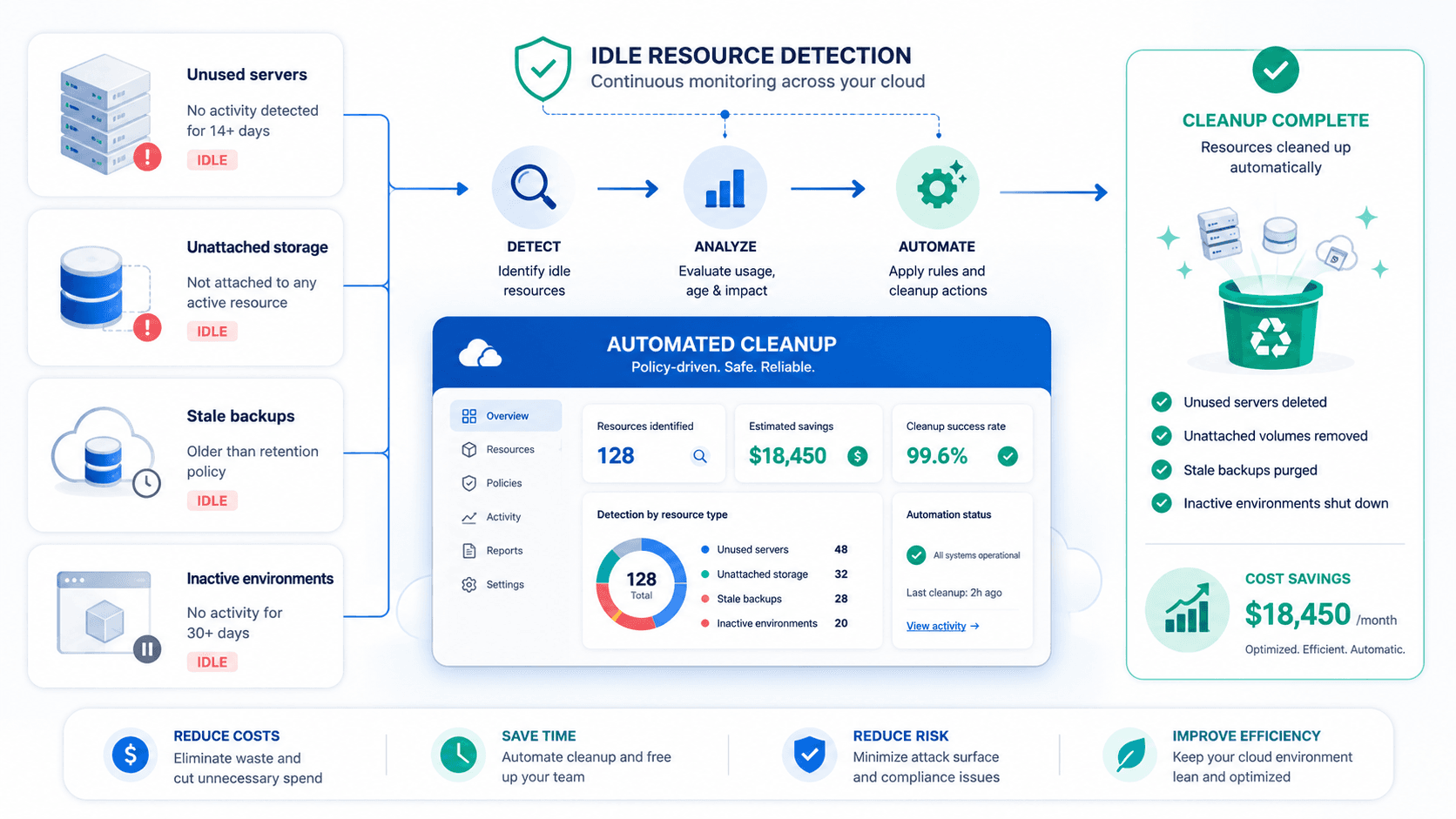
Idle resources are one of the fastest ways to reduce cloud spending.
These resources continue to generate costs even though they are not actively supporting production workloads or business operations.
Common examples include:
- Unused virtual machines
- Unattached disks and volumes
- Old snapshots and backups
- Idle load balancers
- Unused IP addresses
- Forgotten development servers
- Old testing environments
- Orphaned Kubernetes namespaces
- Stale container images
- Unused databases
- Expired proof-of-concept infrastructure
The problem is not that teams intentionally waste money. Cloud environments move fast. Engineers create resources to test, debug, deploy, or experiment. When cleanup is manual, some resources will inevitably be forgotten.
The Fix: Automation
Cloud environments should have automated policies that identify idle resources, notify the responsible teams, and safely remove or shut down resources when they are no longer needed.
For example:
- Non-production environments can be scheduled to run only during business hours.
- Development servers can shut down automatically overnight.
- Old snapshots can follow automated retention policies.
- Unattached storage can be flagged for review.
This is a low-risk, high-impact optimization. It reduces spending without slowing engineering teams because engineers do not have to manually hunt for every forgotten resource. The system does the heavy lifting.
Step 3: Rightsize Compute, Databases, and Containers
Rightsizing means matching cloud resources to actual workload requirements. This applies to virtual machines, databases, containers, Kubernetes pods, storage, and even serverless functions.
The goal is simple: stop paying for capacity you do not use.
Compute Rightsizing
Compute instances are often oversized because teams provision them for safety. That is understandable, but over time it becomes expensive.
A compute rightsizing review looks at:
- CPU utilization
- Memory usage
- Network throughput
- Disk I/O
- Traffic patterns
- Peak usage windows
- Application performance requirements
- Availability requirements
If an instance consistently uses only a small percentage of its allocated capacity, it may be a candidate for downsizing, consolidation, or migration to a better instance family.
The key is to rightsize based on data, not assumptions.
Database Rightsizing
Databases are trickier because performance issues can directly affect user experience. However, they are also a major source of cloud spend.
Database optimization may include:
- Reviewing CPU, memory, and storage usage
- Optimizing queries
- Adjusting read replicas
- Reviewing backup retention
- Moving workloads to managed database services
- Scaling storage based on actual usage
- Archiving old data
- Separating transactional and analytical workloads
Database rightsizing should be done carefully, with performance monitoring and rollback planning.
Kubernetes Rightsizing
Kubernetes is powerful, but it can become expensive quickly.
Many Kubernetes cost issues come from incorrect CPU and memory requests. If requests are too high, the cluster provisions more nodes than necessary. If limits are poorly configured, applications may either waste resources or experience performance issues.
Kubernetes optimization should include:
- Reviewing pod requests and limits
- Improving bin packing
- Removing orphaned namespaces
- Optimizing node pools
- Using autoscaling correctly
- Reviewing cluster utilization
- Separating workload types
- Optimizing persistent volumes
- Monitoring cost per namespace, team, and application
Kubernetes cost optimization is not just about reducing node count. It is about aligning workload demand, cluster capacity, and business value.
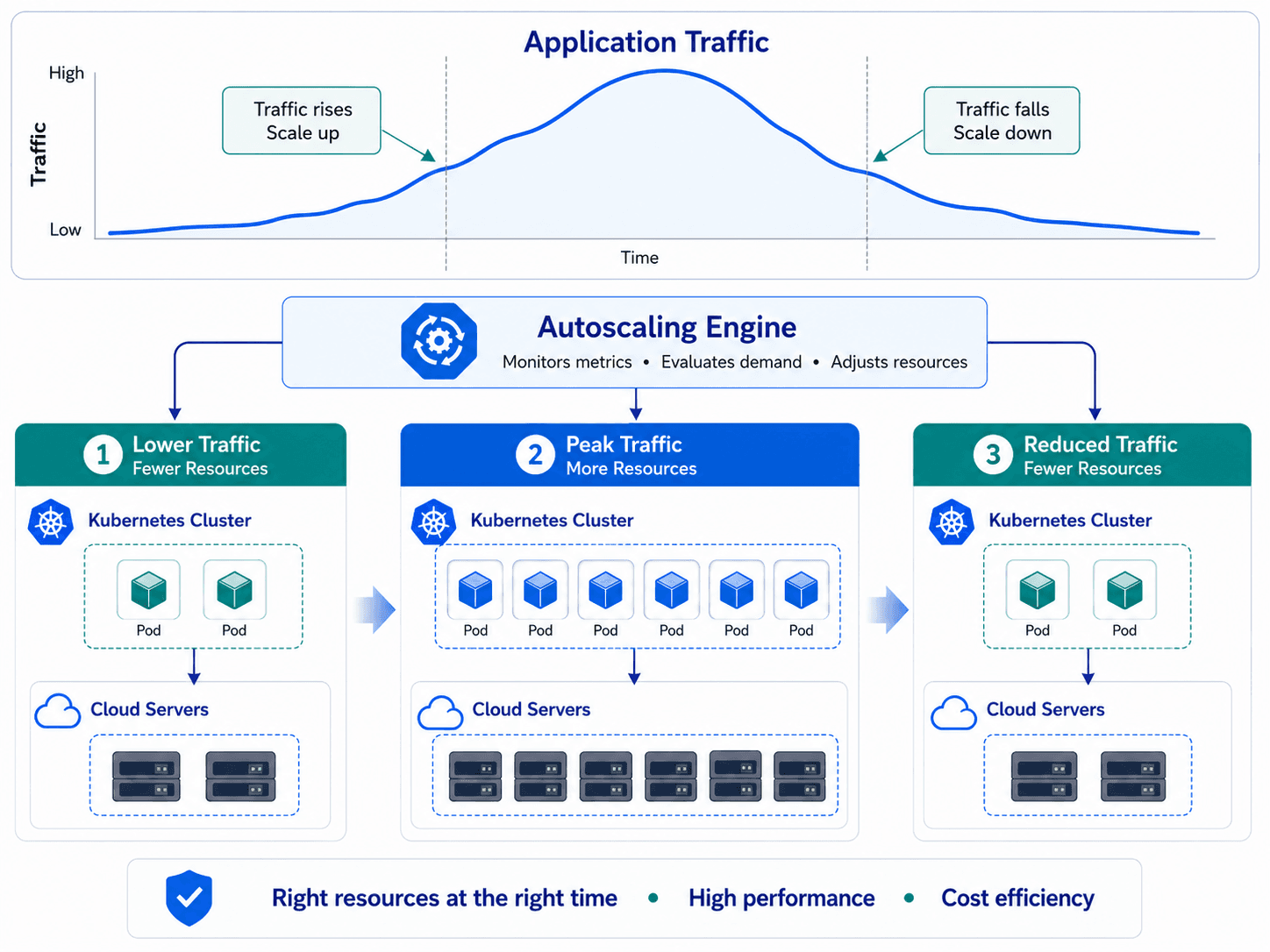
Step 4: Use Autoscaling the Right Way
Autoscaling can reduce cloud costs when configured properly. However, poor autoscaling can also waste money.
A good autoscaling strategy makes infrastructure elastic. Resources should increase when demand rises and decrease when demand drops. This is one of the main advantages of cloud computing, but it only works when scaling policies reflect real application behavior.
Autoscaling should be applied across:
- Virtual machines
- Kubernetes nodes
- Kubernetes pods
- Serverless workloads
- Databases
- Message queues
- Batch-processing jobs
- CI/CD runners
Strong autoscaling requires accurate metrics. CPU alone is not always enough. Some applications need scaling based on memory, queue length, request rate, latency, custom business metrics, or scheduled demand patterns.
For example, an e-commerce platform may need predictable scaling during promotional campaigns. A healthcare platform may experience workload spikes during business hours. A SaaS product may need different scaling rules for different customer tiers.
Autoscaling is most effective when combined with monitoring and alerting. Teams should know when scaling happens, why it happens, and whether it improves performance or simply increases cost.
Step 5: Optimize Storage and Backup Costs
Storage is easy to ignore because it often feels inexpensive at first. However, storage costs compound over time.
Organizations accumulate logs, backups, snapshots, media files, database exports, analytics data, and archived records. Without lifecycle policies, old data can remain in expensive storage tiers long after it is no longer actively used.
Storage optimization starts with classification.
Not all data has the same value or access pattern. Some data requires high availability and fast retrieval. Some data is rarely accessed but must be retained for compliance. Some data can be archived, while other data should be deleted.
A smart storage optimization strategy includes:
- Identifying unused volumes
- Removing duplicate data
- Reviewing backup retention policies
- Moving infrequently accessed data to cheaper storage tiers
- Compressing and deduplicating data
- Archiving old logs
- Deleting expired snapshots
- Monitoring storage growth trends
- Separating hot, warm, and cold data
The goal is not to delete data blindly. The goal is to store data in the right place, at the right cost, and for the right business purpose.
For industries such as healthcare, finance, and insurance, storage optimization must also account for compliance and security requirements. Cost savings should never compromise data protection, privacy, or recovery obligations.
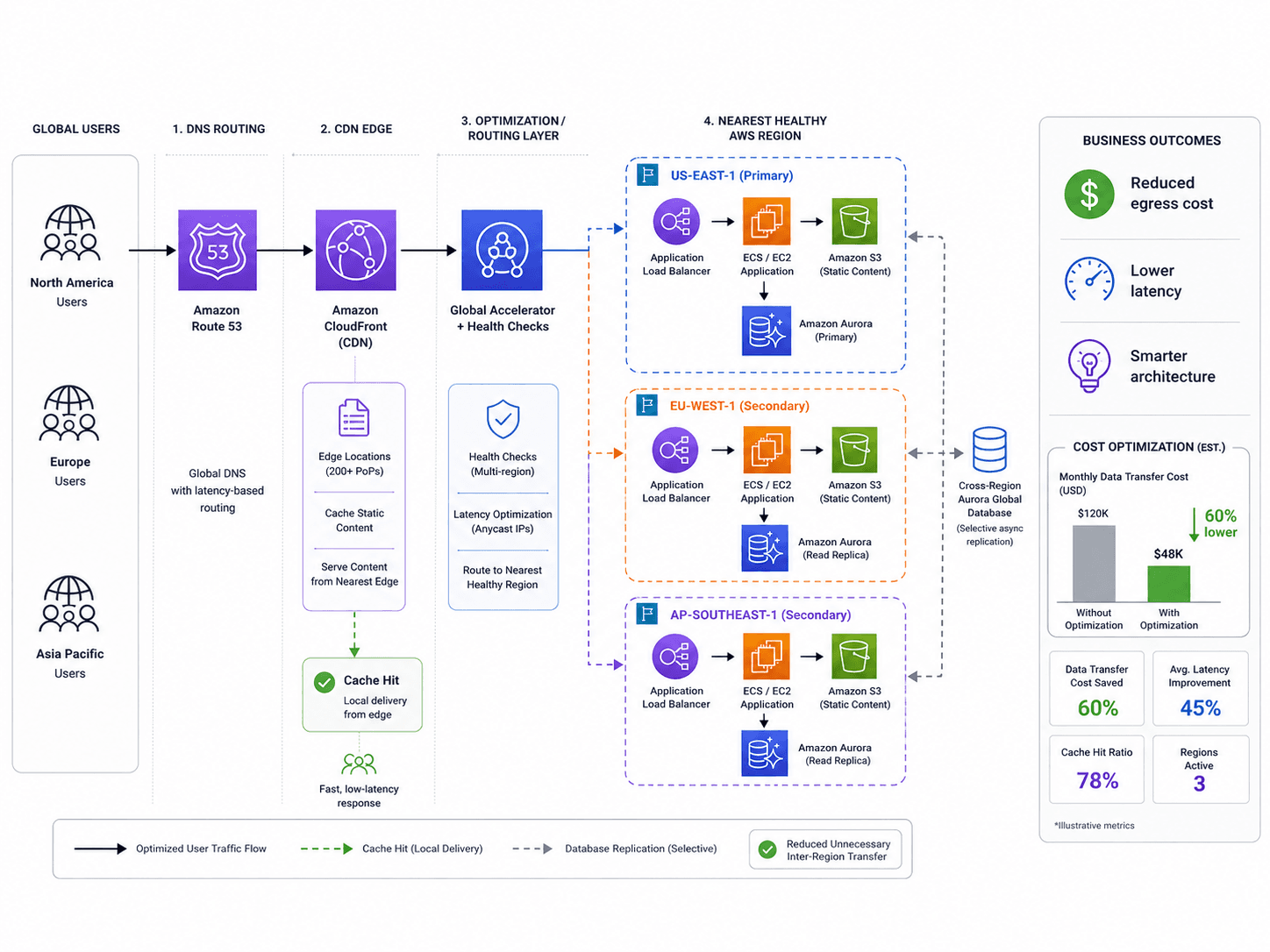
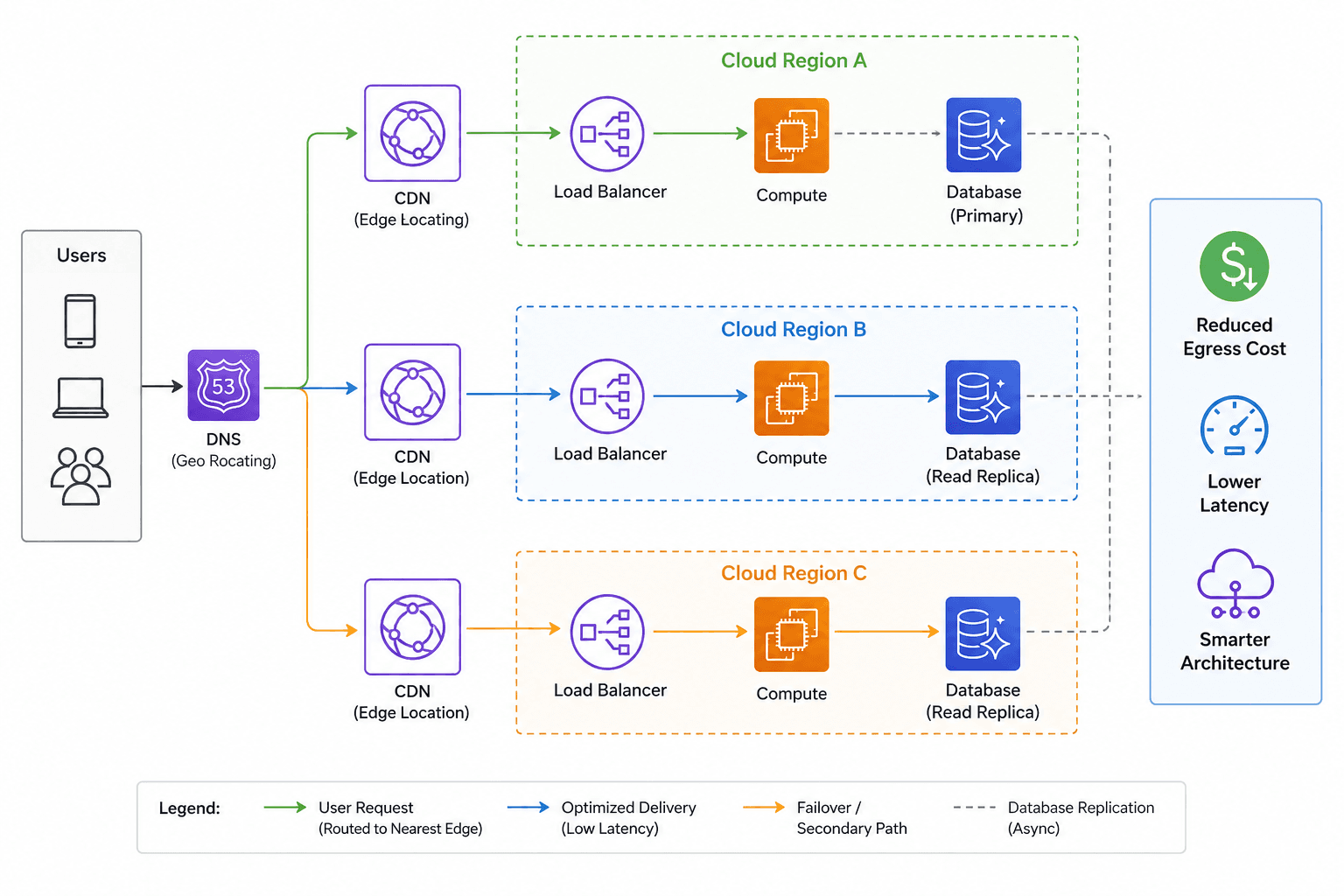
Step 6: Control Data Transfer and Egress Costs
Data movement is one of the most underestimated cloud cost drivers.
Many businesses focus heavily on compute and storage while overlooking network costs. However, data transfer charges can become significant, especially in multi-region, hybrid-cloud, and multi-cloud architectures.
Egress costs may come from:
- Moving data between regions
- Transferring data across availability zones
- Sending data from the cloud to internet users
- Moving data between cloud providers
- Poor CDN configuration
- Inefficient API communication
- Repeated data replication
- Centralized logging across regions
- Analytics pipelines that frequently move large datasets
The challenge is that data transfer costs are often difficult to trace. A cloud bill may show that data transfer is expensive without clearly explaining which service, team, customer, or workflow caused the expense.
Data transfer optimization may include:
- Using a CDN more effectively
- Keeping services closer to users
- Reducing unnecessary cross-region traffic
- Compressing data before transfer
- Reviewing NAT gateway usage
- Optimizing API calls
- Placing related services in the same region
- Re-architecting chatty microservices
- Reviewing backup and replication patterns
Data transfer optimization is especially important for businesses running global applications, analytics platforms, streaming services, AI workloads, or multi-cloud environments.
Step 7: Build FinOps Into Engineering Culture
FinOps is the practice of bringing financial accountability to cloud operations.
However, FinOps should not be treated as a finance-only activity. The most effective cloud cost optimization programs involve finance, engineering, DevOps, product teams, and leadership.
The reason is simple: cloud costs are created by technical decisions.
Every architecture choice has cost implications. Every database design, deployment method, storage policy, CI/CD pipeline, logging configuration, and scaling rule affects the cloud bill.
If engineers do not have visibility into cloud costs, they cannot make cost-aware decisions.
A strong FinOps culture gives teams visibility without slowing them down. It helps engineers understand the financial impact of their work while continuing to prioritize performance, reliability, and delivery speed.
Practical ways to build FinOps into engineering include:
- Showing cloud cost dashboards by team and application
- Adding cost reviews to sprint planning and architecture reviews
- Creating cost alerts for unusual spending patterns
- Including cost impact in deployment reviews
- Defining ownership for shared infrastructure
- Using tags and labels consistently
- Tracking cost per customer, feature, or product
- Reviewing cloud spend monthly with engineering leaders
- Automating budget alerts and anomaly detection
The goal is not to turn engineers into accountants.
The goal is to provide engineers with the same visibility into cost that they already have for performance, uptime, and security.
When cost becomes part of engineering feedback loops, cloud optimization becomes a sustainable, continuous practice.
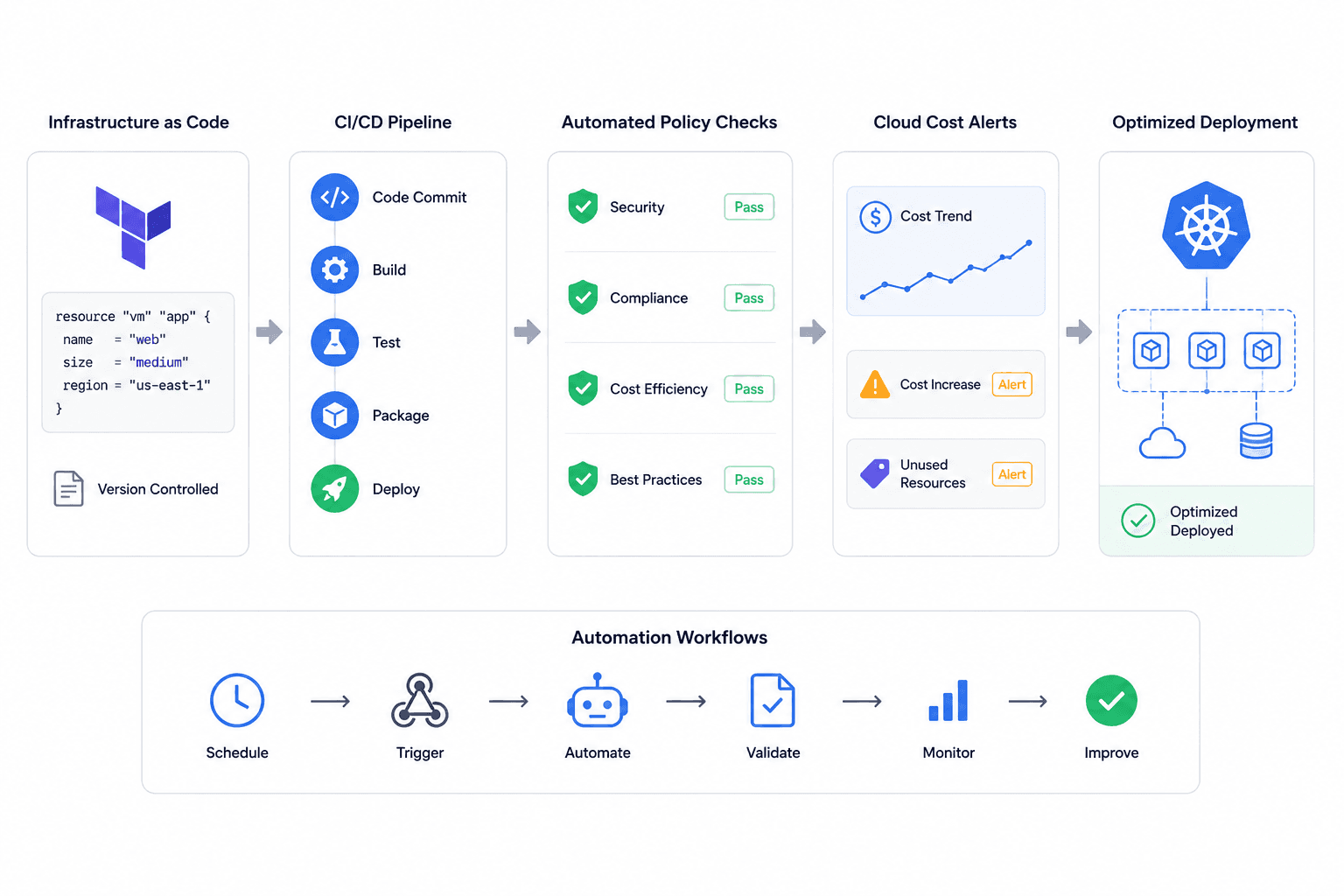
Step 8: Automate Cloud Cost Governance
Manual cloud cost management does not scale.
A spreadsheet may work for a small environment, but it quickly becomes ineffective when teams deploy daily, run Kubernetes workloads, introduce AI services, or operate across multiple cloud providers.
Automation is the difference between temporary cost savings and long-term financial control.
Cloud cost automation can include:
- Automated resource tagging
- Budget alerts
- Anomaly detection
- Scheduled shutdown of non-production environments
- Automatic removal of stale resources
- Infrastructure as Code (IaC) policies
- Rightsizing recommendations
- CI/CD cost checks
- Kubernetes autoscaling
- Storage lifecycle rules
- Security and compliance guardrails
- Automated reporting for leadership
For example, if a development environment is only needed during business hours from Monday to Friday, automation can shut it down outside those hours. If a workload suddenly generates unusual spending, automated alerts can notify the responsible team before the monthly bill arrives. Likewise, storage lifecycle policies can automatically move inactive objects to lower-cost storage tiers after a defined period.
Automation reduces waste without adding operational friction.
This is where DevOps maturity becomes especially valuable. Organizations that already use Infrastructure as Code, CI/CD pipelines, monitoring, and policy automation are better positioned to manage cloud costs continuously rather than relying on periodic optimization efforts.
Step 9: Review Commitments, Reserved Capacity, and Discount Plans Carefully
Cloud providers offer pricing options that can reduce costs for predictable workloads.
These may include reserved instances, savings plans, committed use discounts, enterprise agreements, or long-term capacity commitments, depending on the cloud provider.
These pricing models can generate significant savings, but they also carry risk.
If a company commits too aggressively, it may continue paying for capacity it no longer needs. On the other hand, committing too little may result in missed savings opportunities for stable workloads.
The best approach is to base commitments on baseline usage rather than peak demand.
Stable workloads are ideal candidates for commitment-based pricing. Variable, experimental, or unpredictable workloads are often better suited for on-demand pricing, autoscaling, or spot/preemptible instances.
Before making long-term commitments, teams should review:
- Historical usage
- Forecasted growth
- Workload stability
- Architecture roadmap
- Region and instance flexibility
- Migration plans
- Application modernization plans
- Business seasonality
Commitment-based pricing should support the overall cloud strategy rather than locking the business into outdated infrastructure decisions.
Step 10: Optimize AI and Data Workloads Before They Become Cost Surprises
AI is transforming cloud cost management.
Many organizations are adopting AI-powered features, automation, analytics, chatbots, model inference, and machine learning workflows. These workloads can create substantial business value, but they can also introduce unpredictable infrastructure and usage costs.
AI-related cloud costs may include:
- GPU instances
- Model training
- Model inference
- Vector databases
- Data pipelines
- LLM API usage
- Token consumption
- Storage for training data
- Monitoring and logging
- Experimentation environments
Without effective cost controls, AI experiments can become expensive very quickly.
AI cost optimization requires deeper visibility into spending. Teams should understand cost per model, cost per request, cost per customer, cost per feature, and cost per business outcome.
For example, an AI-powered feature may appear expensive when viewed only by total cloud spend. However, if it significantly improves customer retention, productivity, or revenue, the investment may be fully justified. Conversely, another feature may consume substantial compute resources while delivering minimal measurable business value.
The objective is not to reduce AI usage indiscriminately. Instead, it is to connect AI spending directly to return on investment (ROI).
Businesses should apply the same cloud cost management principles to AI workloads that they use for traditional infrastructure: visibility, ownership, monitoring, automation, and continuous optimization.
Step 11: Measure Unit Economics, Not Just Total Spend
One of the biggest mistakes in cloud cost optimization is focusing only on the total cloud bill.
A growing cloud bill is not always a problem. If revenue, customer usage, and product value are increasing faster than infrastructure costs, the additional spending may be healthy and expected.
A better question is: What are we getting in return for our cloud spend?
This is where unit economics becomes essential.
Cloud unit economics connects infrastructure costs directly to business outcomes. Instead of measuring only monthly cloud spend, organizations also evaluate metrics such as:
- Cost per customer
- Cost per transaction
- Cost per API request
- Cost per active user
- Cost per feature
- Cost per environment
- Cost per product line
- Cost per AI response
- Cost per deployment
- Cost per revenue dollar
This approach changes how teams evaluate cloud spending.
A workload with relatively high infrastructure costs may still be highly efficient if it supports significant revenue or business value. Conversely, a smaller workload with low usage and high maintenance costs may represent a better optimization opportunity.
Cloud cost optimization should never discourage growth. Instead, it should improve operational efficiency.
The objective is to spend smarter, not simply spend less.
Step 12: Keep Security and Reliability in the Optimization Plan
Cloud optimization should never compromise security or reliability.
Reducing costs without proper technical evaluation can introduce serious risks. Removing redundancy may reduce availability. Weakening backup policies may limit recovery capabilities. Downsizing databases too aggressively may impact application performance. Deleting data without compliance review may create legal, regulatory, or operational issues.
A mature cloud optimization strategy balances cost, performance, security, and resilience.
Before implementing optimization changes, teams should ask:
- Will this affect uptime?
- Will this reduce disaster recovery capability?
- Will this impact compliance?
- Will this increase latency?
- Will this affect customer experience?
- Is rollback possible?
- Has the application owner approved the change?
- Are monitoring and alerts in place?
The best cloud cost optimization is invisible to customers. Applications should remain fast, reliable, and secure while the underlying infrastructure becomes more efficient.
That is the balance CodetoKloud focuses on: reducing cloud waste without weakening the infrastructure that supports the business.
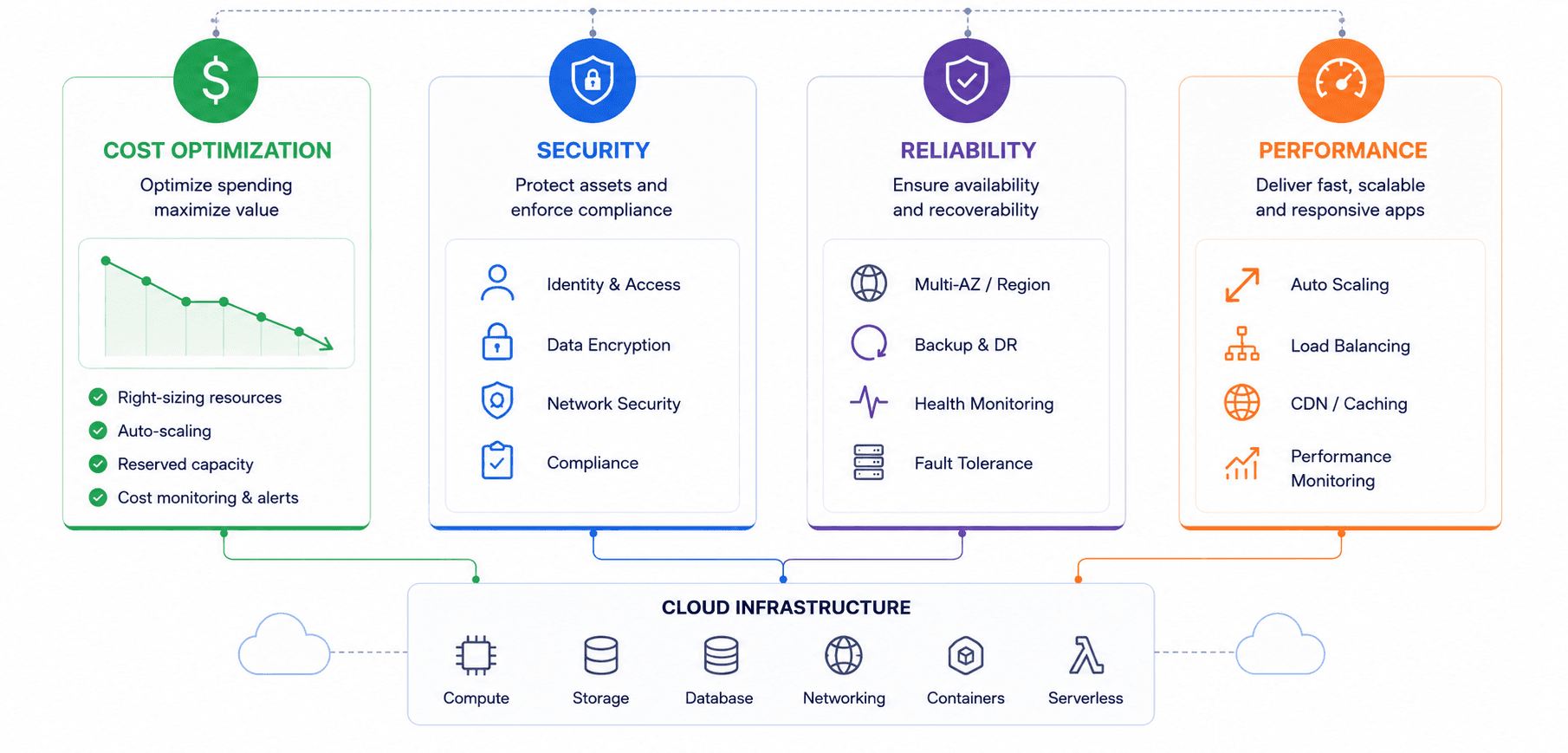
A Practical Cloud Cost Optimization Roadmap for 2026
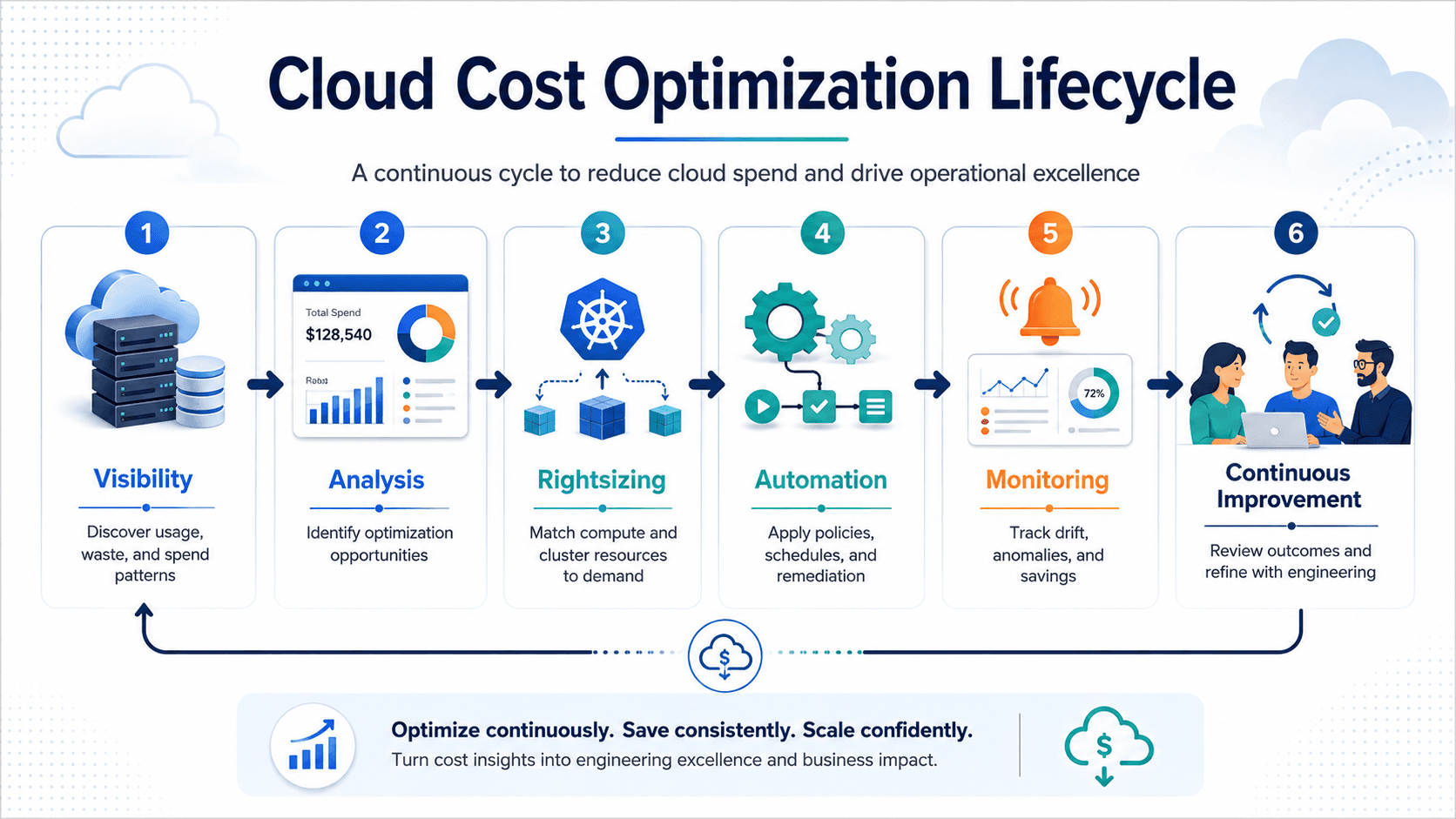
Phase 1: Assess
Start by reviewing the current environment. Analyze cloud bills, infrastructure usage, resource utilization, Kubernetes clusters, storage, databases, data transfer, AI workloads, and monitoring tools. Identify the biggest cost drivers and separate essential spending from waste.
Phase 2: Prioritize
Not every optimization delivers the same value. Focus first on low-risk, high-impact opportunities such as idle resources, oversized development environments, old snapshots, unattached storage, and obvious rightsizing candidates.
Phase 3: Optimize
Implement improvements carefully. Rightsize resources, tune autoscaling, improve storage lifecycle policies, optimize Kubernetes workloads, review database configurations, and reduce unnecessary data transfer.
Phase 4: Automate
Turn one-time improvements into repeatable processes. Automate resource tagging, budget alerts, scheduling, policy enforcement, cleanup, and reporting. Build cloud cost awareness directly into DevOps workflows.
Phase 5: Govern
Establish ownership by assigning cloud costs to teams, applications, environments, or business units. Review spending regularly and provide cost visibility to engineering, product, finance, and leadership.
Phase 6: Improve Continuously
Cloud optimization is never finished after a single cleanup. New deployments, services, AI workloads, traffic patterns, and business priorities continually change the cost profile. Optimization should evolve alongside engineering and product delivery.
Common Cloud Cost Optimization Mistakes to Avoid
Many organizations reduce cloud costs temporarily, only to see expenses rise again a few months later. Avoid these common mistakes.
Mistake 1: Treating Optimization as a One-Time Project
Cloud environments change continuously. A single audit may uncover immediate savings, but it cannot prevent future waste. Continuous monitoring and automation are essential.
Mistake 2: Cutting Costs Without Understanding Business Impact
Not every expensive workload is wasteful. Some high-cost services support critical business operations and revenue. Always connect infrastructure costs to business value before making optimization decisions.
Mistake 3: Ignoring Engineering Teams
Engineering teams design, deploy, and maintain the systems that generate cloud spending. Without their involvement, optimization efforts are often slower, riskier, and difficult to sustain.
Mistake 4: Relying Only on Tags
Resource tags are valuable, but they are often incomplete or inconsistent. Effective cost allocation should combine tags with accounts, projects, environments, applications, and ownership policies.
Mistake 5: Forgetting About Kubernetes
Kubernetes can conceal costs across clusters, namespaces, pods, and shared infrastructure. Organizations using Kubernetes need dedicated visibility into cluster-level spending.
Mistake 6: Optimizing Only Compute
Compute is only one part of cloud spending. Storage, databases, networking, observability, AI workloads, and SaaS services can also contribute significantly to infrastructure costs.
Mistake 7: Choosing Savings Plans Without Usage Analysis
Long-term pricing commitments can reduce costs, but inaccurate forecasting may create unnecessary spending. Commit only to stable, predictable baseline usage.
How CodetoKloud Helps Businesses Reduce Cloud Costs
CodetoKloud helps businesses design, optimize, automate, and manage cloud environments that support sustainable growth without unnecessary waste.
Our approach focuses on practical cloud cost optimization rather than arbitrary cost-cutting. We help organizations understand where cloud spending occurs, eliminate waste, improve infrastructure efficiency, and implement automation that keeps costs under control over time.
Our cloud cost optimization services include:
- Cloud infrastructure assessment
- Cloud cost audit
- DevOps workflow review
- Kubernetes optimization
- Rightsizing recommendations
- Autoscaling improvements
- Storage optimization
- CI/CD pipeline optimization
- Infrastructure as Code (IaC) implementation
- Monitoring and alerting setup
- Security and compliance review
- Cloud migration planning
- Multi-cloud and hybrid cloud strategy
- Ongoing cloud management and support
Whether your organization runs on AWS, Microsoft Azure, Google Cloud, Kubernetes, or a hybrid cloud environment, our goal remains the same: build infrastructure that is scalable, secure, reliable, and cost-efficient.
Final Thoughts
Cloud cost optimization in 2026 is not about slowing engineering teams down.
It is about providing better visibility, stronger automation, and smarter infrastructure practices so teams can innovate faster without creating unnecessary waste.
The organizations that succeed will not simply be those that reduce the largest percentage from their cloud bill. They will be the ones that understand which cloud investments create business value, which generate waste, and how to continuously improve the balance between the two.
Cloud infrastructure should help your business move faster, not quietly consume your budget in the background.
If your cloud costs continue to rise, your infrastructure is becoming increasingly difficult to manage, or your teams lack visibility into where spending occurs, now is the time to act.
A smarter cloud strategy can reduce waste, improve performance, strengthen reliability, and give engineering teams the freedom to innovate without unnecessary cost pressure.
Ready to Reduce Cloud Costs Without Slowing Down Your Engineering Team?
CodetoKloud can help you review your cloud infrastructure, identify hidden waste, optimize workloads, automate cost controls, and build a practical roadmap for long-term cloud efficiency.
Let's find where your cloud budget is leaking and transform your infrastructure into a smarter, leaner, and more scalable growth engine.
Turn this guidance into a practical cloud plan
Bring your AWS, DevOps, Kubernetes, security, or AI automation concern to a focused 30-minute review. We will confirm fit and identify three useful priorities.