
How AI Is Changing DevOps: Gains, Risks, and Controls
AI is increasing code and change volume, but DevOps gains depend on review capacity, small batches, strong testing, access controls, and reliable measurement.
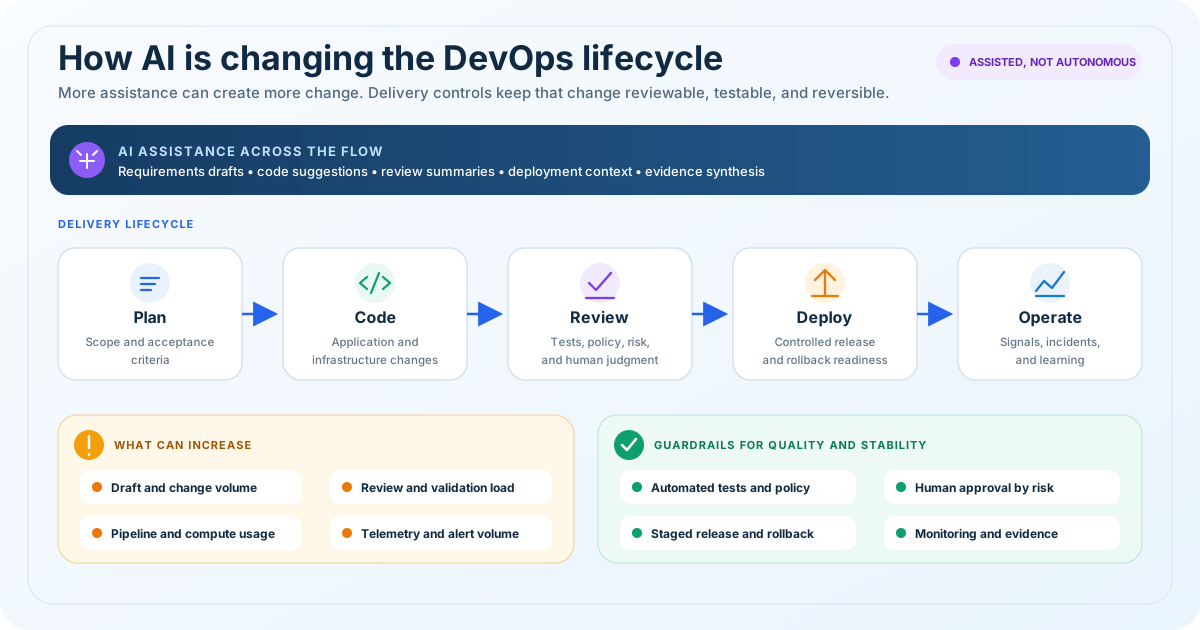
The short answer
AI has made many DevOps tasks faster, but it has not automatically made software delivery faster or safer. Teams can generate scripts, pipeline changes, tests, runbooks, and infrastructure definitions in less time. That often increases the number of changes entering the delivery system. If review capacity, automated validation, platform standards, and rollback practices do not improve at the same pace, the result can be a larger queue of plausible changes that still require careful verification.
That distinction matters for technology leaders. Task speed is the time one person needs to produce an artifact. Perceived productivity is how much more effective that person feels. Throughput is how quickly a change moves from commit to production. Stability is how reliably those deployments perform. AI can improve the first two while the last two remain flat or get worse.
The practical response is not to prohibit AI or deploy it everywhere at once. Use it where outputs are easy to verify, give it approved context, keep changes small, and measure the whole delivery path. CodetoKloud's AI consulting services, DevOps consulting services, and security and compliance services can help teams design that operating model around their existing cloud environment.
What the research actually says
The evidence is more useful when studies are compared at the correct level.
GitHub ran a randomized controlled study in which experienced developers completed a defined coding task. The Copilot group produced code that performed better on several measures in that study, including unit test completion, readability, maintainability, and approval likelihood. This is credible evidence that an assistant can improve performance on a bounded task. It does not prove that every team will deploy more frequently or experience fewer incidents in production.
DORA examines the broader software delivery system. Its generative AI research reported that greater AI adoption was associated with higher individual productivity and better developer experience. It also found that a 25 percent increase in AI adoption was associated with a 1.5 percent decrease in delivery throughput and a 7.2 percent decrease in delivery stability in the analyzed data. Associated with is the important phrase. These figures describe statistical relationships, not a guarantee that AI caused a particular team's results.
The 2025 DORA report describes AI primarily as an amplifier. Strong internal platforms, clear workflows, fast feedback, and healthy engineering practices give AI useful rails. Fragmented tools, slow reviews, weak tests, and unclear ownership can also be amplified.
Current DORA software delivery metrics separate throughput and instability. Throughput includes change lead time, deployment frequency, and failed deployment recovery time. Instability includes change fail rate and deployment rework rate. This gives leaders a better measurement frame than counting generated lines or accepted suggestions.
What increased after AI entered DevOps
1. Change volume
Engineers can draft Terraform, Kubernetes manifests, workflow files, tests, documentation, and remediation scripts quickly. More drafts become pull requests, and existing pull requests can grow. That can be valuable when the team keeps batches small. It becomes a problem when generation speed encourages broad changes that combine application logic, infrastructure, permissions, and deployment behavior.
Track pull request count and size together. A higher count of small, independently deployable changes is different from a higher volume of large changes that wait for scarce reviewers.
2. Review demand
Generated output still consumes reviewer attention. It may look polished while containing a wrong assumption about an API, provider version, regional capability, identity boundary, or failure mode. Reviewers must confirm intent as well as syntax.
AI can also assist review. Amazon Q Developer, for example, documents code review capabilities that combine generative AI and rule-based analysis for security, quality, infrastructure, secrets, dependencies, and deployment risks. That is an additional signal, not a replacement for the accountable engineer. Teams considering pipeline modernization can review CodetoKloud's automated deployment services and the EKS GitOps migration case study for examples of explicit promotion and approval boundaries.
3. Documentation and test assistance
AI is useful for first drafts of runbooks, architecture decision records, change summaries, unit tests, negative tests, and incident timelines. It can turn existing technical context into a clearer explanation and expose missing acceptance criteria.
The benefit depends on the source context. A generated runbook based on current commands, dashboards, and ownership data can shorten authoring time. A generic runbook can create false confidence. Tests generated from the implementation alone may reproduce the implementation's assumptions, so reviewers should compare them with requirements and failure scenarios.
4. Validation load
Faster generation raises the amount of work that linters, scanners, test environments, policy engines, and reviewers must process. CI queues can lengthen. Cloud test costs can rise. Flaky tests become more disruptive because they are triggered more often.
Validation capacity is therefore part of the AI budget. Before expanding adoption, measure queue time, test duration, flaky test rate, review latency, and the percentage of changes that need rework. Cloud and platform engineering services can help standardize reusable paths so each team does not invent validation from scratch.
5. Security exposure
AI can produce insecure defaults, overly broad permissions, unpinned dependencies, outdated APIs, accidental public access, or code that mishandles secrets. It may suggest a resource or package that does not exist. It can also receive sensitive repository, incident, customer, or infrastructure context through prompts and connected tools.
The OpenSSF guidance recommends treating AI-written code as potentially vulnerable, checking dependencies and secrets, using least privilege, and incorporating security tests. GitHub's responsible-use documentation similarly warns that generated code can be inaccurate or insecure and requires careful review and testing. NIST's Generative AI Profile provides a broader governance model for identifying, measuring, managing, and monitoring risks.
For cloud operations, the potential blast radius is important. A weak application suggestion might fail a test. A weak identity policy, network rule, or infrastructure change could expose data or alter production resources. Use separate credentials, read-only access by default, scoped tool permissions, protected environments, and human approval for material changes.
6. Tooling and operating cost
License fees are only one cost. Add model usage, security controls, private context integrations, CI minutes, preview environments, storage, audit logs, administration, training, and additional review time. The value calculation should compare total operating cost with verified outcomes such as reduced lead time, fewer repetitive support steps, faster recovery, or improved documentation coverage.
Do not make accepted suggestions, prompt counts, or generated lines the primary return measure. Those are activity signals. FinOps services can help connect cloud and tooling consumption to business ownership without treating cost reduction as the only goal.
Where AI helps DevOps most
The strongest early use cases have a clear input, a bounded output, and a deterministic or expert verification step.
Good candidates include:
- Explaining an unfamiliar log query or pipeline stage
- Drafting unit tests and negative test cases for reviewed requirements
- Summarizing a pull request or incident timeline from approved data
- Converting a known manual procedure into a draft runbook
- Proposing a small infrastructure change that will pass a plan and policy review
- Generating documentation from an approved service catalog
- Finding likely causes for an alert while an operator controls every action
- Suggesting review questions for IAM, network, Kubernetes, and CI changes
Higher-risk uses include autonomous production changes, incident remediation with write access, identity policy generation without ownership context, large migrations, and any workflow that exposes regulated or confidential data to an unapproved service.
The main operational risks
Plausible but wrong output
Generated content often has the structure and vocabulary of a correct answer. That can lower reviewer skepticism. Require tests that validate behavior, not just formatting, and make the author explain the intended change and rollback path.
Context gaps
An assistant rarely knows every organizational constraint. It may not understand a service-level objective, data residency requirement, exception process, shared network dependency, or the reason behind an unusual control. Approved repository instructions and platform templates can supply context, but they must be versioned and reviewed.
Secret and data leakage
Prompts, tool calls, logs, and generated artifacts can carry credentials or sensitive information. Define what data can enter each tool, enable enterprise controls where appropriate, redact diagnostics, scan commits, and keep production secrets in managed secret stores.
Supply chain expansion
An assistant can add modules, actions, container images, plugins, or packages faster than teams can evaluate them. Require approved sources, lock files, immutable versions where practical, dependency scanning, and explicit review for new dependencies.
Automation without safe authority
An agent with repository, cloud, ticketing, and shell access can cross system boundaries. Limit tools and credentials to the current task. Separate drafting from execution. Log actions. Require approval before deletion, privilege changes, production deployment, or data movement.
Skill atrophy and unclear accountability
Teams still need engineers who can reason about distributed systems, cloud identity, networking, failure modes, and recovery. Assign a human owner to every change. Rotate review and incident responsibilities so operational knowledge remains distributed.
A practical 90-day rollout
Days 1 to 30: baseline and bound the pilot
Choose one or two teams and two low-risk workflows. Good starting points are test drafting, change summaries, runbook improvement, or review assistance. Record a baseline for the specific service using the five current DORA metrics. Add local measures such as pull request size, review time, CI queue time, rework, escaped defects, and security findings.
Publish an acceptable-use policy covering approved tools, data classifications, prohibited inputs, retention, dependency rules, and human accountability. Document which actions assistants may recommend and which actions they may execute. Confirm vendor controls with security, privacy, legal, and procurement teams.
Days 31 to 60: build the verification path
Add repository instructions, secure templates, schema validation, unit and integration tests, secret scanning, dependency checks, infrastructure plans, and policy-as-code gates. Protect production environments and require named approval for material infrastructure, identity, data, or deployment changes.
Train engineers on failure patterns, not only prompting. Use real examples of hallucinated resources, excessive permissions, stale APIs, missing rollback steps, and tests that confirm the wrong behavior. Review false positives and false negatives from AI-assisted review tools.
Days 61 to 90: compare outcomes and decide where to scale
Compare the pilot with its own baseline, not with a different product or team. Look for shorter lead time without higher change fail rate or deployment rework. Check whether reviewers are overloaded, CI cost has changed, incidents require more rework, or engineers are spending less time on toil.
Scale a workflow only when its validation path is reliable and ownership is clear. Pause or narrow use cases that create large batches, frequent corrections, sensitive-data concerns, or unstable changes. Keep a quarterly review because models, product capabilities, and organizational risks change.
Questions buyers should ask before selecting an AI DevOps tool
- What repository, prompt, and telemetry data does the service retain or use?
- Can access be restricted by repository, environment, data classification, and user role?
- Are actions and generated changes auditable?
- Can the tool operate in recommendation-only or read-only modes?
- How are model, policy, and feature changes communicated?
- What deterministic checks run before a suggestion can merge or deploy?
- Can the organization export usage, quality, security, and cost data?
- What is the exit plan if the tool does not improve delivery outcomes?
If these questions expose gaps in the surrounding platform, a DevOps and cloud assessment can prioritize the controls before broader adoption.
Frequently asked questions
Will AI replace DevOps engineers?
AI can automate portions of authoring, analysis, and documentation. Production accountability, architecture decisions, risk acceptance, incident command, and tradeoff management still require qualified people. Roles are likely to shift toward verification, platform design, governance, and systems reasoning.
Does AI always increase deployment frequency?
No. It can increase the supply of changes without increasing review, test, or release capacity. Measure deployment frequency together with lead time, recovery time, change fail rate, and deployment rework rate.
What is the safest first AI use case for a DevOps team?
Start with a bounded task whose output is easy to verify, such as drafting tests, summarizing a change, or improving a runbook from approved source material. Keep production execution and privileged access outside the first pilot.
Should AI-generated infrastructure code be treated differently?
Yes. Infrastructure and policy changes can affect many resources at once. Require schema validation, security scanning, a human-reviewed plan or change set, protected deployment environments, and a tested rollback or recovery path.
How should leadership measure return on AI investment?
Use service-level delivery and reliability outcomes, supported by cost and workflow measures. Avoid using generated lines, accepted suggestions, or tool logins as proof of business value.
Sources and further reading
- DORA 2025 State of AI-assisted Software Development
- DORA Impact of Generative AI in Software Development
- DORA software delivery performance metrics
- GitHub controlled study of Copilot and code quality
- NIST AI Risk Management Framework Generative AI Profile
- OpenSSF Security-Focused Guide for AI Code Assistant Instructions
- Amazon Q Developer code review documentation
- GitHub responsible use guidance for Copilot agents
Review how AI fits your delivery system
Map the highest-value use cases, the controls they need, and the delivery metrics that will show whether AI is helping your engineering system.